
Notification
Notifications display messages in the Shopware Administration to inform users about events, errors, or completed actions. They remain visible in the notification center (bell icon) until dismissed by the user.
See also: Base Options for shared configuration options supported by SDK message APIs.
notification.dispatch()
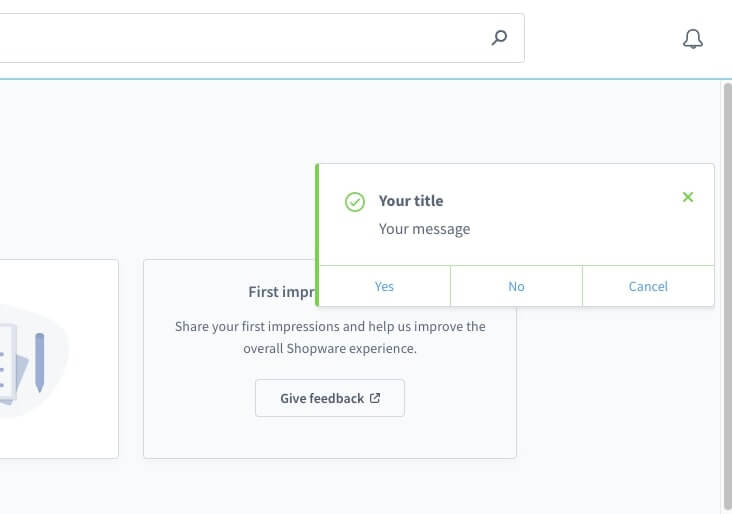
Usage
ts
import { notification } from "@shopware-ag/meteor-admin-sdk";

function alertYes() {
  alert("Yes");
}

notification.dispatch({
  title: "Your title",
  message: "Your message",
  variant: "success",
  appearance: "notification",
  growl: true,
  actions: [
    {
      label: "Yes",
      method: alertYes,
    },
    {
      label: "No",
      method: () => {
        alert("No");
      },
    },
    {
      label: "Cancel",
      route: "https://www.shopware.com",
      disabled: false,
    },
  ],
});
Parameters
| Name | Required | Default | Description |
|---|---|---|---|
title | true | Defines a notification's title. | |
message | true | Defines a notification's main expression or message to the user. | |
variant | false | info | Defines the notification type. Available variant types are success, info, warning and error. |
appearance | false | notification | Changes the style of a notification. Use system for technical notifications thrown by the application. Otherwise keep the default value notification. |
growl | false | true | Displays a notification that is overlaying any module. Use false to display the notification in the notification center (bell symbol) only. |
actions | false | [] | Adds clickable buttons to the notification. Each button with a label can trigger a method or open a route (internal route or external link). Buttons can also be disabled using the attribute disabled. |
Return value
Returns a promise without data.
