
Chapter 3: Read the component you extend
WARNING
Single File Component (SFC) support for Administration extensions is experimental. It is available since Shopware 6.7.16.0. The APIs described on this page can still change without a deprecation. Try it out and tell us what you find, but do not ship an extension built on it to customers or to the Shopware Store until the API is declared stable (planned for 6.9).
In this chapter the banner gets dynamic text: it shows the actual margin of the product. For that, you fill the <script setup> block with TypeScript.
Where that state lives
sw-product-detail-base is not a Single File Component. Like most of the Administration today it is a pair of files:
src/Administration/…/view/sw-product-detail-base/
├── index.js                          ← the Options API configuration
└── sw-product-detail-base.html.twig  ← the template you took the block name from
index.js exports an Options API object - data(), computed, methods, props - and everything in it hangs off this when the component runs. That object is what your override reads from, so it is worth opening alongside the template when you plan an override. sw-product-detail-base has a product computed:
// src/Administration/…/view/sw-product-detail-base/index.js
computed: {
    product() {
        return Shopware.Store.get('swProductDetail').product;
    },
    // …
},
useSwPreviousState()
To access that state, you can't use this.product. A composable hands it to you instead:
const previousState = useSwPreviousState();Like swDefineOverride(), it is auto-imported, and it exists only inside an .override.vue file. What it gives you is everything the component you override exposes: its data, computed, methods and props.
So previousState.product is the product currently open in the form, including unsaved edits.
Read values with .value
previousState.product is a ref, so read it with .value in your script:
const name = previousState.product.value?.name;In a template Vue unwraps it for you, as it does with any ref.
Work out the margin
A product carries its selling price in price and, optionally, what it cost you in purchasePrices. Both are arrays with one entry per currency, so the first entry is the one shown in the form:
// A price field holds one entry per currency; the first one is what the form shows.
function firstNetPrice(prices: unknown): number | null {
    const [first] = (prices ?? []) as { net?: number }[];

    return typeof first?.net === 'number' ? first.net : null;
}

const margin = computed(() => {
    const product = previousState.product.value;
    const sellingPrice = firstNetPrice(product?.price);
    const purchasePrice = firstNetPrice(product?.purchasePrices);

    if (!sellingPrice || !purchasePrice) {
        return null;
    }

    return (sellingPrice - purchasePrice) / sellingPrice;
});
Types for entity fields
firstNetPrice narrows the price field by hand because the generated entity schema types it loosely.
Values for the template
The banner needs two more values: whether the margin is too low, and a sentence to show. Below 25% counts as too low:
const isTooLow = computed(() => margin.value !== null && margin.value < 0.25);

const message = computed(() => {
    if (margin.value === null) {
        return 'This product has no purchase price, so no margin can be calculated.';
    }

    return `You earn ${(margin.value * 100).toFixed(1)}% on every sale of this product.`;
});
Using values in the template
Your override's bindings are available inside its <sw-block extends> content, and they read like any other Vue template binding:
<sw-block extends="sw_product_detail_base_price_form">
    <sw-block-parent />

    <mt-banner :variant="isTooLow ? 'critical' : 'positive'">
        {{ message }}
    </mt-banner>
</sw-block>
Mutating a binding in the template
Inside the <sw-block extends> content of an override, assigning to a binding - @click="counter++" - is rejected at build time. Wrap the mutation in a function in the script and call that from the event handler instead: @click="increment()".
The whole file
The margin and the verdict are computed in the script; the template just reads them:
<!-- <plugin root>/src/Resources/app/administration/src/override/sw-product-detail-base.override.vue -->
<template>
    <sw-block extends="sw_product_detail_base_price_form">
        <sw-block-parent />

        <mt-banner
            class="swag-margin-hint"
            :variant="isTooLow ? 'critical' : 'positive'"
            :title="isTooLow ? 'Margin too low' : 'Margin looks healthy'"
        >
            {{ message }}
        </mt-banner>
    </sw-block>
</template>

<script setup lang="ts">
import { computed } from 'vue';

const previousState = useSwPreviousState();

// A price field holds one entry per currency; the first one is what the form shows.
function firstNetPrice(prices: unknown): number | null {
    const [first] = (prices ?? []) as { net?: number }[];

    return typeof first?.net === 'number' ? first.net : null;
}

const margin = computed(() => {
    const product = previousState.product.value;
    const sellingPrice = firstNetPrice(product?.price);
    const purchasePrice = firstNetPrice(product?.purchasePrices);

    if (!sellingPrice || !purchasePrice) {
        return null;
    }

    return (sellingPrice - purchasePrice) / sellingPrice;
});

const isTooLow = computed(() => margin.value !== null && margin.value < 0.25);

const message = computed(() => {
    if (margin.value === null) {
        return 'This product has no purchase price, so no margin can be calculated.';
    }

    return `You earn ${(margin.value * 100).toFixed(1)}% on every sale of this product.`;
});

swDefineOverride({});
</script>
The strings stay hardcoded for now; Chapter 4 moves them into snippet files.
Checkpoint
Reload a product that has a purchase price set:
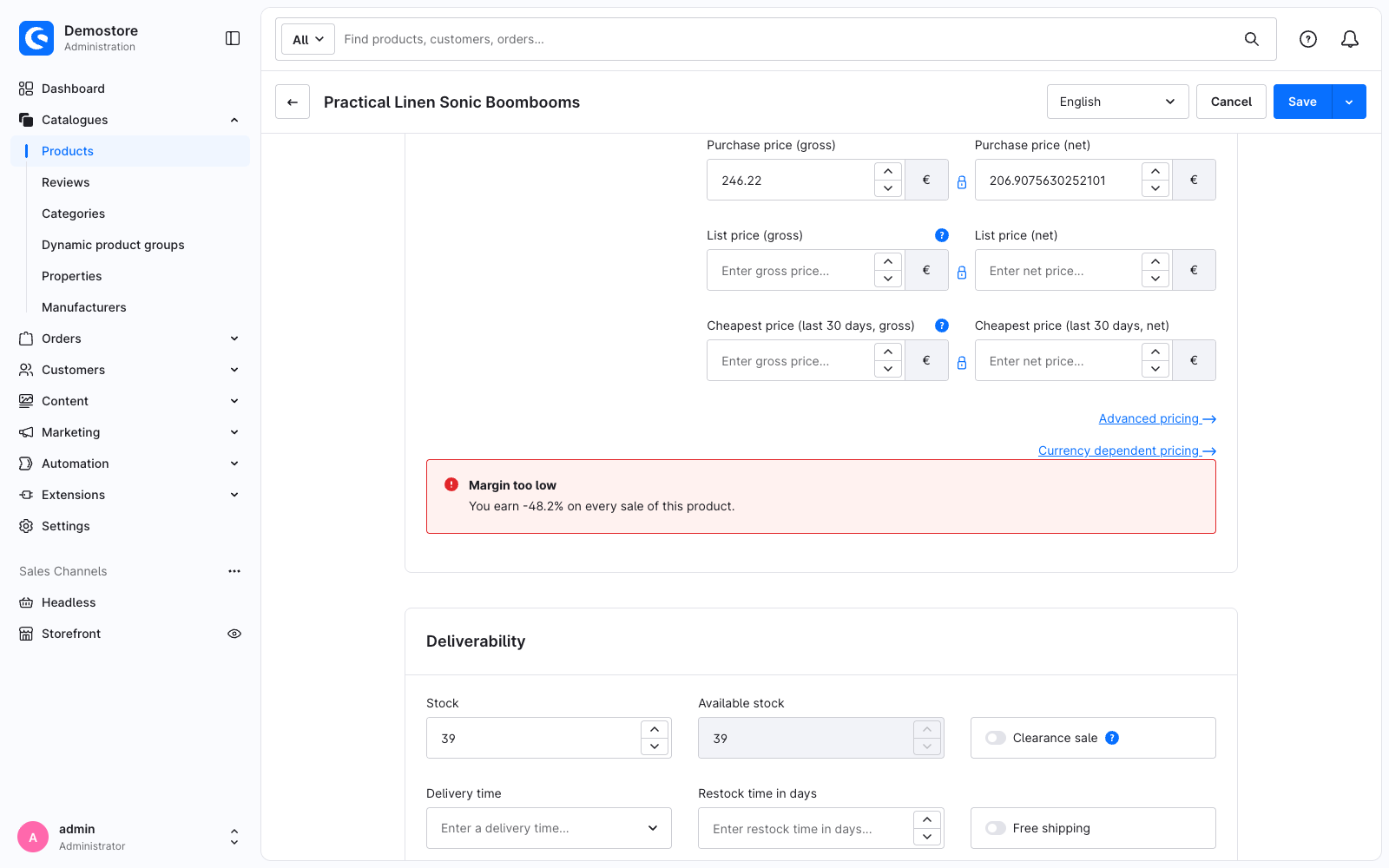
Edit the purchase price and watch the percentage follow along.
Two more composables
useSwPreviousState() has two companions, and all three exist only inside an override:
| Composable | Returns |
|---|---|
useSwPreviousState() | The state of the component you override. Refs are not unwrapped |
useSwProps() | The props that component was given, read only |
useSwContext() | Its Vue setup context: emit, attrs, slots, expose |
Reference: useSwPreviousState(), useSwProps(), useSwContext().
What this replaces
this.<name> becomes previousState.<name>.value, and the override config becomes plain setup code.
Next: Build your own component.
