
Chapter 4: Build your own component
WARNING
Single File Component (SFC) support for Administration extensions is experimental. It is available since Shopware 6.7.16.0. The APIs described on this page can still change without a deprecation. Try it out and tell us what you find, but do not ship an extension built on it to customers or to the Shopware Store until the API is declared stable (planned for 6.9).
The override file from Chapter 3 does three jobs at once: it decides where the banner goes, it works out the margin, and it renders the markup. In this chapter the last two move into a component of your own.
A base component is a .vue file
Create the component as a single file:
<plugin root>/src/Resources/app/administration/src/component/swag-margin-hint.vueThe filename is the component's name: this file is the component swag-margin-hint. swag-margin-hint/index.vue would mean the same.
Same rule as for overrides
This is the naming rule of an .override.vue file from Chapter 2, without the .override part, because this file is a component of its own.
Your override imports it directly, so there is nothing else to do:
import SwagMarginHint from '../component/swag-margin-hint.vue';Where the data comes from
The product form keeps the product it is editing in a store, and the core price form reads it from there. Your component does the same:
import useSwProductDetailStore from 'shopware:stores/swProductDetail';

const product = computed(() => useSwProductDetailStore().product);
shopware:stores/* is one of the virtual modules the Administration publishes for extensions: the part after the slash is the store's registry key, and the default export is its composable. There are shopware:composables, shopware:utils, shopware:data and shopware:mixins alongside it.
Reading the store has two advantages. The product detail page keeps the store filled, so the component works in any block of that page, not only in the one your override picks. And it does not depend on what one core component happens to expose through previousState.
Where the strings come from
Chapter 3 wrote its English straight into the override. A component you ship reads its strings from snippet files instead:
<plugin root>/src/Resources/app/administration/src/component/
├── snippet/
│   ├── de-DE.json
│   └── en-GB.json
└── swag-margin-hint.vue
snippet/en-GB.json holds the four strings the banner needs:
{
    "swag-margin": {
        "hint": {
            "tooLow": "Margin too low",
            "healthy": "Margin looks healthy",
            "noPurchasePrice": "This product has no purchase price, so no margin can be calculated.",
            "margin": "You earn {margin}% on every sale of this product."
        }
    }
}
snippet/de-DE.json repeats the same keys:
{
    "swag-margin": {
        "hint": {
            "tooLow": "Marge zu niedrig",
            "healthy": "Marge sieht gut aus",
            "noPurchasePrice": "Dieses Produkt hat keinen Einkaufspreis, daher lässt sich keine Marge berechnen.",
            "margin": "Du verdienst {margin}% an jedem Verkauf dieses Produkts."
        }
    }
}
There is nothing to import and nothing to register. Shopware collects every en-GB.json, de-DE.json and friends from anywhere under src/Resources/app/administration/src/ of every active plugin, and caches the result. That happens on the PHP side and does not touch the JavaScript build, so the existing Adding snippets guide applies to a Single File Component unchanged.
Apply the changes by clearing the cache and reloading the page:
shopware-cli project console cache:clearIn a template you read a key with $t(). It is a Vue global property, so there is nothing to import:
<p>{{ $t('swag-margin.hint.tooLow') }}</p>A <script setup> block has no this to reach $t through, and an extension cannot import { useI18n } from 'vue-i18n' - see troubleshooting. Use the composable instead:
import { useTranslateWithFallback } from 'shopware:composables';

const { tWithFallback } = useTranslateWithFallback();

const title = computed(() => tWithFallback(isTooLow.value ? 'swag-margin.hint.tooLow' : 'swag-margin.hint.healthy'));
tWithFallback() tries the active locale, then the fallback locale, and returns the key itself when neither has an entry. That makes it the script-side counterpart of $t(), which falls back to English the same way.
Keys with a placeholder
tWithFallback() takes a key and nothing else. For "margin": "You earn {margin}% …" you therefore either interpolate in the template, with $t('swag-margin.hint.margin', { margin: … }), or call Shopware.Snippet.t(key, params) in the script. The component below does the latter, because the next section makes message available to extensions, and Chapter 5 overrides it.
Reference: useTranslateWithFallback().
swDefinePublic()
Every base component declares what it exposes to extensions:
swDefinePublic({
    margin,
    isTooLow,
    title,
    message,
});
Like swDefineOverride(), it is auto-imported and mandatory. If you do not want to expose anything, use swDefinePublic({}) without any entries.
What it means: a base component is private by default. Every top-level binding becomes ordinary component state that your own template can read, and only the names you list here become part of the API other extensions may replace.
Chapter 5 is where that list gets used.
Reference: swDefinePublic().
Styles
Until now, the banner sat flush against the price fields, because the content of a block gets no spacing of its own. A component brings its own styles in a <style scoped> block, so it can add the gap itself:
<style scoped>
.swag-margin-hint {
    margin-top: 24px;
}
</style>
scoped limits the rules to the markup of this component, so they cannot leak into the rest of the Administration. The template wraps the banner in a div with the class swag-margin-hint, which is what the rule targets.
A prop for the threshold
Chapter 3 hardcoded the 25% threshold. Make it a prop instead, so whoever renders the component decides. A base component declares its props with Vue's defineProps(), as in any <script setup>:
const { warnBelow = 0.2 } = defineProps<{
    warnBelow?: number;
}>();

const isTooLow = computed(() => margin.value !== null && margin.value < warnBelow);
Without a value, warnBelow is 0.2. The override below passes :warn-below="0.25", so the banner keeps the threshold from Chapter 3.
The component
<!-- <plugin root>/src/Resources/app/administration/src/component/swag-margin-hint.vue -->
<template>
    <div class="swag-margin-hint">
        <mt-banner
            :variant="isTooLow ? 'critical' : 'positive'"
            :title="title"
        >
            {{ message }}
        </mt-banner>
    </div>
</template>

<script setup lang="ts">
import { computed } from 'vue';
import useSwProductDetailStore from 'shopware:stores/swProductDetail';
import { useTranslateWithFallback } from 'shopware:composables';

const { warnBelow = 0.2 } = defineProps<{
    warnBelow?: number;
}>();

const { tWithFallback } = useTranslateWithFallback();

const product = computed(() => useSwProductDetailStore().product);

// A price field holds one entry per currency; the first one is what the form shows.
function firstNetPrice(prices: unknown): number | null {
    const [first] = (prices ?? []) as { net?: number }[];

    return typeof first?.net === 'number' ? first.net : null;
}

const margin = computed(() => {
    const sellingPrice = firstNetPrice(product.value?.price);
    const purchasePrice = firstNetPrice(product.value?.purchasePrices);

    if (!sellingPrice || !purchasePrice) {
        return null;
    }

    return (sellingPrice - purchasePrice) / sellingPrice;
});

const isTooLow = computed(() => margin.value !== null && margin.value < warnBelow);

const title = computed(() => tWithFallback(isTooLow.value ? 'swag-margin.hint.tooLow' : 'swag-margin.hint.healthy'));

const message = computed(() => {
    if (margin.value === null) {
        return tWithFallback('swag-margin.hint.noPurchasePrice');
    }

    return Shopware.Snippet.t('swag-margin.hint.margin', {
        margin: (margin.value * 100).toFixed(1),
    });
});

swDefinePublic({
    margin,
    isTooLow,
    title,
    message,
});
</script>

<style scoped>
.swag-margin-hint {
    margin-top: 24px;
}
</style>
The override shrinks
All the override still decides is where:
<!-- <plugin root>/src/Resources/app/administration/src/override/sw-product-detail-base.override.vue -->
<template>
    <sw-block extends="sw_product_detail_base_price_form">
        <sw-block-parent />

        <swag-margin-hint :warn-below="0.25" />
    </sw-block>
</template>

<script setup lang="ts">
import SwagMarginHint from '../component/swag-margin-hint.vue';

swDefineOverride({});
</script>
useSwPreviousState() is gone from this file, and so is every line of arithmetic.
Checkpoint
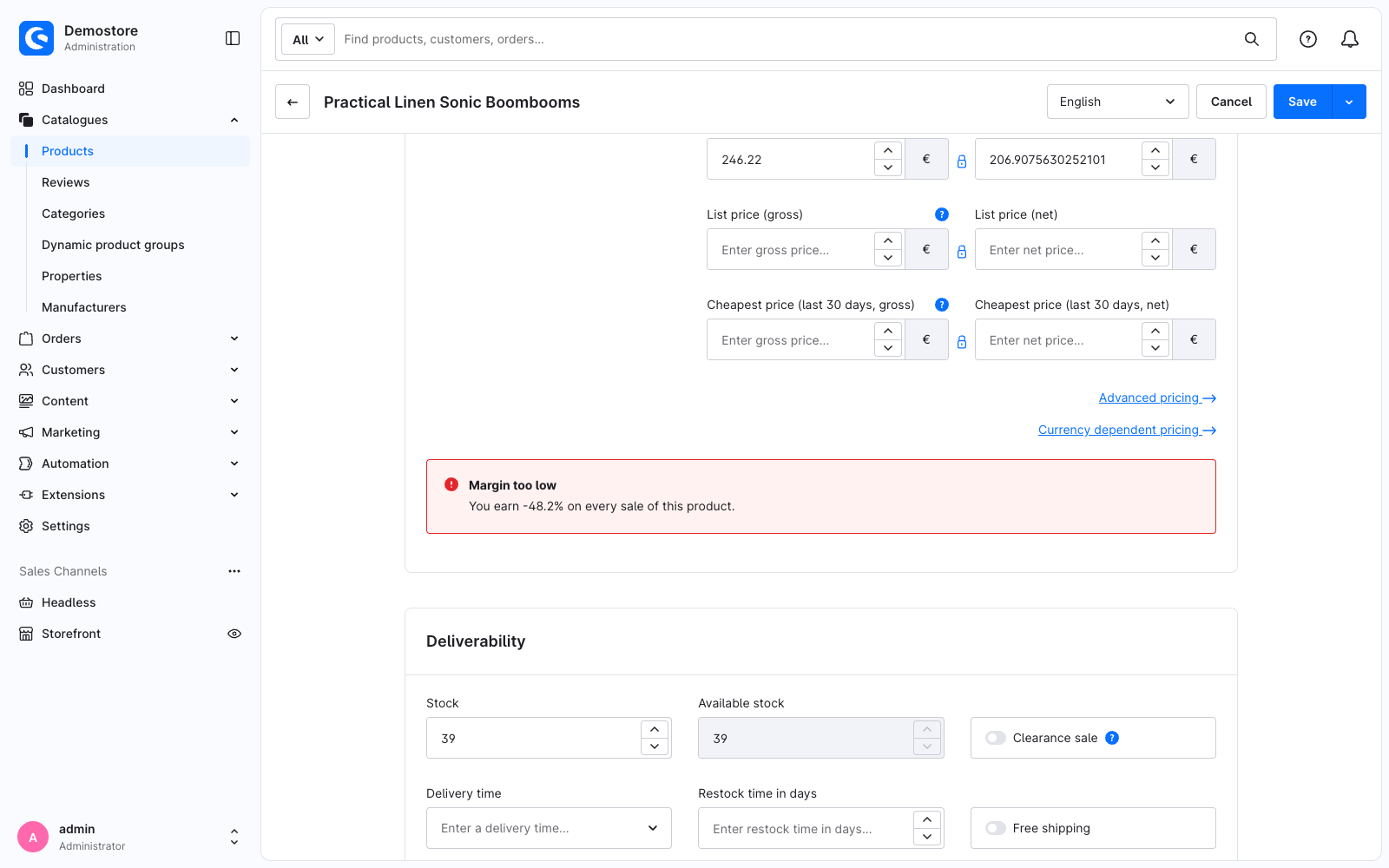
Reload the product. The banner looks as it did in Chapter 3 except for one thing: it no longer sits flush against the price fields. That is the gap Chapter 2 promised, and it comes from the component's own <style scoped> block. Everything else changed underneath: the markup, the arithmetic and the strings now live in a component that reads the product from the store, so you can render it in any block of the product detail page.
What this replaces
The Options API version has no equivalent of swDefinePublic, because everything on this was implicitly public. The extra line is what makes the component's contract explicit.
The snippet files are the same in both tabs, and so is where they sit: this.$tc() becomes tWithFallback() only because a <script setup> block has no this.
Registering a component by name
Usually you do not need to register your own components anywhere: an import is enough, which is what this chapter does. There is one exception, the case where something has to find your component by a string: you want to write <swag-margin-hint /> anywhere in the Administration without importing it first.
Using the tag without an import
Put the component in its own directory with an index.ts beside it:
component/swag-margin-hint/
├── index.ts
└── swag-margin-hint.vue// <plugin root>/src/Resources/app/administration/src/component/swag-margin-hint/index.ts
Shopware.Component.register('swag-margin-hint', async () => {
const component = (await import('./swag-margin-hint.vue')).default;
return { ...component, _renderedBySfcTemplate: true } as never;
});Import that index.ts once from main.ts, and the tag resolves everywhere:
// <plugin root>/src/Resources/app/administration/src/main.ts
import './component/swag-margin-hint';
The .vue file moved into the new directory, so if you keep the import in the override, its path becomes '../component/swag-margin-hint/swag-margin-hint.vue'.
_renderedBySfcTemplate: true tells the component factory that this component brings its own markup. A production build moves the render function inside setup(), where the factory does not find it, and without the flag it refuses to build the component, see the troubleshooting page. The flag is an internal detail of the factory rather than a stable API; it is documented here because there is no other way to register a .vue base component by name today.
